Customizing Form Templates Assets
Forms are pre-configured digital documents that are associated with an asset type to give the users (dispatchers and mobile app users) specific information about the asset. Each asset type has one form attached to that sis appears in the Asset Form tab. The asset form and its information is accessible and can be edited by any user with the correct permissions (dispatchers and mobile app users).
The procedures described in this article are a continuation of the procedures described in Creating and Editing Form Templates.
Searchable Fields
To facilitate the Asset Lookup mobile module you can define fields that are searchable. When you insert a new text box, select the Searchable in Assets Lookup checkbox.
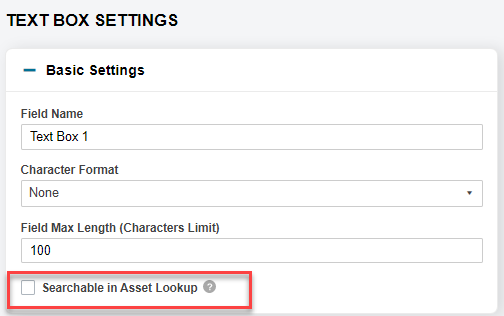
You can only make Text Box or Text Area fields searchable.
After making you changes, click Save to save the form template.
Assigning a Form to Asset Types
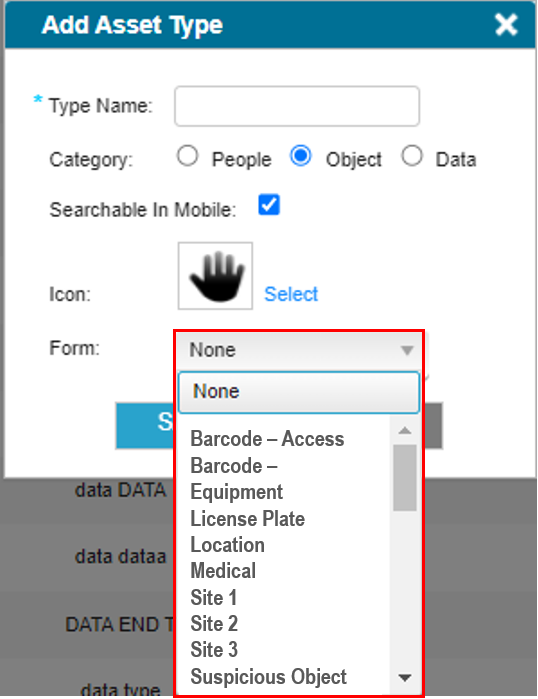
Once the form has been created it can now be assigned to an Asset Type, select the required form from the dropdown.
Read more about Assets.


